Or split in 4 payments - No late fees, Sharia compliant!
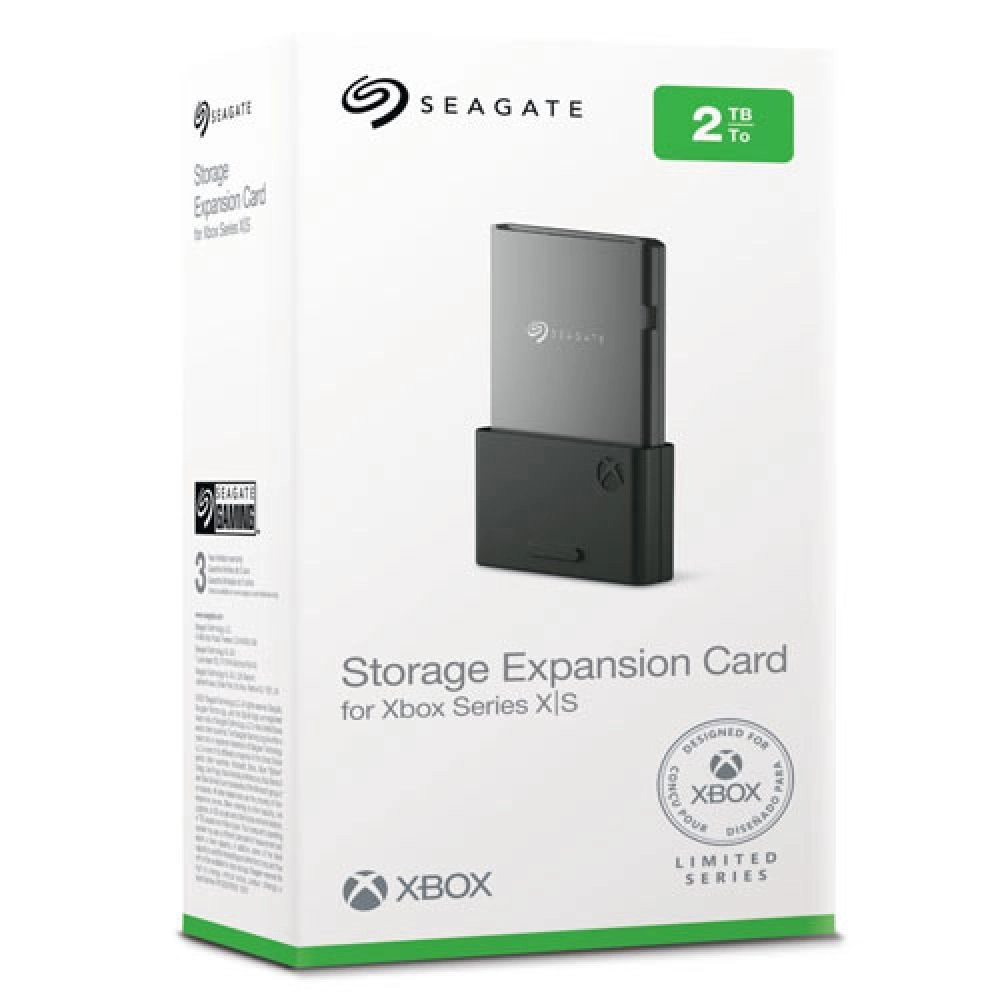
Plug into the most powerful Xbox console ever — the Seagate Storage Expansion Card for Xbox Series X|S.
Up to 2 TB of capacity expansion Seamless integration into the Xbox Velocity Architecture Virtually no lag in power or speed when gaming from the expansion card
Same day free delivery in U.A.E Express delivery to Saudi Arabia,Bahrain,Oman,Kuwait 3 to 4 Days Express delivery to Rest of the world
Seagate Storage Expansion Card for Xbox Series X|S
As low as: AED 999.00
As low as:
FREE DELIVERY
Same-day free delivery in U.A.E
EXPRESS DELIVERY WORLDWIDE
2 Days express delivery worldwide.
100% AUTHENTIC PRODUCTS ONLY
Original Brand New Products Only.
Same-day free delivery in U.A.E
2 Days express delivery worldwide.
Original Brand New Products Only.
DETAILS
Seagate Storage Expansion Card for Xbox Series X|S
Instantly expand the peak speed capacity of Xbox’s most powerful gaming experience.
The next great leap in gaming is here with Xbox Series X|S. Exclusively co-engineered in partnership with Xbox, this storage expansion card connects a custom internal PCIe Gen4x2 NVMe SSD to the Xbox Velocity Architecture. This means you get the same peak load times and gameplay as the internal SSD in your next-generation Xbox—just plug and play.
Fastest. Most Powerful. Instantly expand the capacity of Xbox Series X or Xbox Series S.
Room for Play No sacrificing graphics, latency, load times, or framerates — play Xbox Series X|S games from the internal SSD or the storage expansion card.
A Powerful Partnership We created the Seagate Storage Expansion card in close partnership with Xbox to ensure when you plug this storage card into either the Xbox Series X or Xbox Series S, you’re getting all the speed and performance Xbox dreamed up for this next generation of console gaming.
Seamless Gameplay Compatible with the Xbox Velocity Architecture — providing faster load times, richer environments, and more immersive gameplay.
No Wasted Seconds Quick Resume enables players to seamlessly switch between multiple titles and resumes instantly from where they last left off — always the same speed from the expansion card and the internal SSD.
Level Up Your Legacy Syncing with the ultra-powerful Xbox Velocity Architecture’s groundbreaking hardware, CPU, and deep software integration, every game that plays from the Storage Expansion Card for Xbox Series X|S plays at the same peak levels as the console’s internal SSD. That includes thousands of Original Xbox, Xbox 360, and Xbox One games.
All Your Xbox Games, One Console Grab a Seagate Game Drive external hard drive and store all your legacy and Xbox Series X|S games in one place. Plug-and-play compatible with Xbox Series X and Xbox Series S, it’s time to build the massive library of your dreams. The perfect compliment to your next-level gaming.
Fantastic. This was bought for me along with my xbox series S, basically so I don't get bored whilst having to stay on my bed (disabled.) I love it due to the fact of storing more games. I must say the only down side is the price but it is worth every penny. There is no lag in speed etc as you would get with external storage.
I'm writing this because of all the reviews I see complaining about the drive not showing up on their computer initially, saying "It doesn't work right out of the box!" I often wonder if some of these people never even read the documentation before giving up. The included documentation for the drives is horrible, with only a Quick Start page that shows how to plug it in, but there is great info on Seagate's site that helps if you go look at it. There's also something else I found out that might be helpful, and I'll address that here. Once I've had it in use for a while I'll update this review for a more in-depth account of how well it works. I'll list my comments by issue: 1) Drive not getting recognized. After seeing so many "it doesn't show up" comments, I was concerned when mine didn't show up on my iMac either. I followed the instructions on plugging it in (in sequence, which may or may not make a difference, but you gotta do it correctly just in case), and the first thing you have to do is decide which US Standard plug to slide onto the universal plug adapter; there are two that are almost identical, two-prong plugs; one has holes in the prongs and the other doesn't. Docs say nothing about which to use, so I went with the one with holes. The unit powered up and sounded like it was initializing, but it wouldn't get recognized by my Late 2017 iMac. Unplugging and restarting did nothing. I went to the online documentation and did the recommended check to see if Show Hard Drives was checked in Finder/Preferences/Show-Hard Drives. It was (which I already knew because my others show there, but just in case I needed to recycle the command...). That did no good. After a bit of thought, I decided I'd try the other plug, and that did the trick. USE THE PLUG WITH NO HOLES IN IT if using it in the US! Once that was solved, it showed up and all looked good. 2) Using Time Machine on Mac. The info in the product description says the drive is ready to use with Time Machine, preformatted. The problem is, if you have Catalina or later, there is a new formatting called APFS that replaces xFat, and you will have to reformat to use with Time Machine. This is a simple process using Disc Utility, and it reformats quickly. Once I had that issue solved, I got Carbon Copy Cloner (trial version) and set up the tasks of copying my main hard drive (348.3 GB) and my 8 TB external drive to the new Seagate drive and let it go. The main drive was backed up in just over 47 minutes. Yeah, it's a tad noisy, but nothing that can't go on while working on the computer by any means unless you're maybe recording a YouTube video at the computer or something. The external drive, which had 6.58 TB of stuff on it took a little longer... 12 1/2 hours to be exact. Slow? I don't know, it's the first time I've copied a hard drive with that much stuff on it, but I set the task and left it alone and it was done in the morning. The image included here shows Carbon Copy's review page for the performed tasks. CAVEAT: you may need to use a program that allows the computer to work without shutting down after a period of inactivity. I use an app called "Amphetamine", which forces the computer to stay on in various circumstances that you can set. I set mine to remain on "as long as the specified app is working" and chose Carbon Copy Cloner. Not sure you have to do this, but Amphetamine is a great app and I didn't want to take the chance of having to start over, so I used it, and it worked great. The noise some complaint about could be from other drives (I have the 12 TB version for desktop) or it may be a personal preference, but a drive in a plastic case like this with lots of air holes in it will make some noise, however, I didn't find this "noisy" at all IMHO. So far, I'm impressed with Carbon Copy as well, but like the drive, I'm in my infancy with using it, so time will tell. I also have a 1 TB external I use for Time Machine, so instead of using this one for that, I will most likely also set up the drive to copy that drive so I have a backup of my Time Machine just in case. You can set Carbon Copy to copy whenever it detects a change in a drive, so once the initial copying is done, the lengthy copies are done, and it's only copying when things change. If you have issues with one of these drives not being recognized by your computer straight out of the box, FIRST make sure you have the correct US plug installed. THEN, make sure to reformat to APFS if you're running Catalina or later if you plan to use it for your Time Machine backups. At that point, so far in my experience, it's a great drive. I'm giving four stars only because of having to hunt down good documentation for the actual necessity for reformatting for the OSs, and for having NO information about the right plug to use. NO idea why the one with holes won't work, but it would be nice if they gave a heads-up on that. Once it's been working for a while, I'll readdress this review.
This is definitely a must have for me. With the size games are today, extra storage is a must or you need to be diligent with what's on the drive at any given time. If you got the Series S this is almost mandatory. With the Series X you have a little more wiggle room. That being said, if you are on a tight budget you may want to wait. As it is newer tech it is pricy for what you get. Eventually there will be probably be other options (more TB) and the price would drop then for 1TB. But today this is the only one you can get that works seamlessly with the new consoles. That is why 1TB is at this price. If you can afford it you won't regret it. If this is too expensive for you, 2/3 the cost of the Series S or 2/5 the cost of the X, wait and see. If you are a gamer that plays many different games, then you will find the convenience and quality of this drive worth it
With games these days taking so much space and getting latger and larger with every update, getting one of these is essential. It’s fast and works without any issues. If it fits into your budget I recommend getting one.
You don't NEED this SSD for external storage. In fact, I unplugged my 4TB external HDD from my Xbox One X and plugged it right into the Series X with no formatting or anything. The games were all there but must be transferred to internal storage, or this SSD to play. Transfer speed between internal and this card are very fast. Probably 20x's faster than the transfer from the 7200 rpm 4TB external. This card basically acts like an extension of the internal drive. Just want to be clear though, you do NOT need this to store games. You can transfer from an external HDD to internal pretty quickly. Much faster than downloading the game again. Even transfer between this SSD and the external is speedy. Think of it like you're just adding another TB of storage to the internal drive. But again, not required for game atorage. My Series X shows all 3 of my storages (internal, SSD, and 4TB External).
Works effortlessly with the new Xbox series consoles as advertised. Plug it in and it is ready to go. Store and play Xbox series games, series enhanced games, or back compatible games directly from this expansion card. The down side is that it is expensive. You pay about the same for this 1TB of proprietary memory as you would for a fast 2TB external SSD, but you cannot play Xbox series or series enhanced games from an external SSD. If you have the money to spend, it makes things very simple.
This takes me back to the PS 1 and 2 memory cards. I loved those things. Insert, data is right there and play. Now PS5 has some convuluted way of adding memory to their system and XBOX has the equivalent of a memory card. I have both systems. This is not a batch fest, just a critique. 10/10. Hoping it goes down in price so I can get a 2nd one.
Got this for my 500gb series s, good to have if you have game pass. Had it for about a month now, nothing major to report problem wise. Just plug and play, you can choose where games download and if you plan to move it from console to console. I don't see myself filling this up so the extra space is nice to have for peace of mind without having to juggle games back and forth between a hard drive if the game is enhanced for s/x.
Xbox Series X/S Expansion Card SSD works seamlessly.
Reviewedsscol on
I do think this is a good product and it does work flawlessly in the Xbox Series X and S. I put no on the "Good Value" because I do believe it is a little high at it's current price, but it is a new product and could come down in price which is pretty much controlled by Microsoft. It is good quality with seamless plug & play in my Xbox series S. I purchased the 1 TB model and have relegated it to holding my XB apps and games that are reverse compatible & XB One games. The games work just as if you had them on the hard drive with no difference in performance I can see. Plus it saves time if you were storing your games on a external hard drive that you would have to move onto the system to play.
this is a must buy for anyone with a series console. The added storage is so nice, I was sick of only having 3-5 games on my internal and having to constantly switch them out. This thing made it so much easier. Also no install time or configuring. Pop it in, say yes to being used only on that console and youre ready to go